---
title: The iPod Wheel
slug: looks-like-ipod-wheel-with-a-spring
date: 2026-03-24 00:00:00
author: Konstantin
authorAvatar: /images/avatar.png
description: Looks like the classic iPod wheel but with a spring
featured_image: /images/posts/ipod-wheel.png
category: Features
content_type: post
authorUrl: https://iamkonstantin.eu
fediverse: @iamkonstantin@mstdn.social
---
## How it started
One of the core features of the app is to be able to quickly regenerate a mood playlist. Imagine you're making a playlist for your daily commute, workout or a focused study session - you can quickly request the app to put together a playlist with the desired duration.
A recent update to the app adapted the controls for controlling the playlist size and this is how it looked:
## The Idea
Responding to me trying to show-off layout changes, a fan of the app on Mastodon posted:
[Cursed idea: replace the buttons with a facsimile of an iPod jog wheel](https://ieji.de/@alin/116206209380516420)
So why not...
## iPod Wheel
For those of us who remember [the iPod](https://en.wikipedia.org/wiki/IPod), one of the most iconic aspects of the device was the clickwheel. There were multiple iterations of the design but my favourite was the Mini which I had in high school:
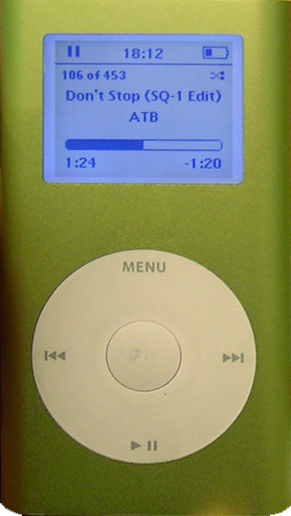
While functionally this was going to remain a [picker component](https://developer.apple.com/design/human-interface-guidelines/pickers), I wanted to somehow incorporate the look of the iPod wheel. In trying to picture how this would work, I also realised it would be an interesting technical challenge as well.
The initial list of features I thought were important:
- It should be big enough so one doesn't have to aim too much (which is a big drawback to the original +/- picker)
- Haptic feedback
- At least as fun to use as it is to build
That last point was supposed to be my persona guardrail so I don't spend too much time on it, but more on that later.
## Iteration 1
The first version was just a couple of circles and basic math for handling touch events. It was enough to get a feel for how this may work within the app and also it helped me refine the look and feel.
- The touch area needed to be bigger
- The rotation logic required more work so it feels more connected, like the finger gesture is actually responsible for the changes in the playlist size.
- After a while of playing with it, I also wanted to give it a different visual flair. Like what if the iPod wheel was made in 2026?
## Iteration 2
How cool would it be if the component were based on a spring mechanism? It always returns to initial position and changing the values feels like winding up a toy.
I also made the touch handle a lot bigger, giving it colour and a visual response when pressing the component for the first time, as well as a bit of a bouncy entrance when the sheet first opens.
## Iteration 3
Remember how one of the goals was not to spend too much time on it? It turns out, there are a lot of things you can do with a wheel-like control so I spent almost the entire weekend refining the physics of it and adding some extra features.